Intégration Rentman

Connect Rentman to StageReturn
Synchronize repairs, serialized equipment immobilization, and non-serialized equipment inventory changes between StageReturn and Rentman.
In This Guide
- Understand the Rentman integration
- Configure the connection using an API token
- Synchronize repairs and equipment immobilization
- Link non-serialized equipment
- Automatically deduct and restore quantities
- Manage warehouse connections
- Monitor synchronization statuses and errors
1. What is the Rentman integration used for ?
The Rentman integration connects StageReturn to Rentman in order to synchronize important information without requiring duplicate data entry.
StageReturn remains the platform for reporting incidents, documenting defects, creating repairs, and maintaining repair history. Rentman continues to manage equipment availability and inventory quantities.
Keep information consistent between StageReturn and Rentman whenever equipment is immobilized, reported as missing, or reported as returned.
2. Available Features
Repairs
Create and track repairs in StageReturn while synchronizing the availability of the corresponding equipment in Rentman.
Serialized Equipment
Equipment identified by a serial number can be located in Rentman and marked as unavailable when ERP immobilization is enabled.
Non-Serialized Equipment
Link quantity-managed equipment in StageReturn to their corresponding items in Rentman.
Quantités manquantes
When a quantity is reported as missing in StageReturn, it can be automatically deducted from the Rentman inventory.
Quantités revenues
When missing equipment is reported as returned, the corresponding quantity can be automatically restored in Rentman.
Warehouse Connection
Each Rentman connection can be assigned to the relevant StageReturn warehouses to maintain a clear synchronization scope.
3. Configure the Rentman Connection
The connection is configured from the StageReturn administration panel, in the ERP & Integrations section. ERP & intégrations.
Generate a Rentman API Token
From your Rentman account, open the integration settings and generate an authorized API token.
Add the Connection in StageReturn
Open the ERP & Integrations page, select Rentman, and enter the API token.
Select the Warehouses
Select the StageReturn warehouses that should use this Rentman connection.
Test the Connection
Run the connection test to verify that the API token is valid and that StageReturn can communicate with Rentman.
Protect the API token as you would a password. Never publish it and share it only with authorized users.
4. Repairs and Serialized Equipment
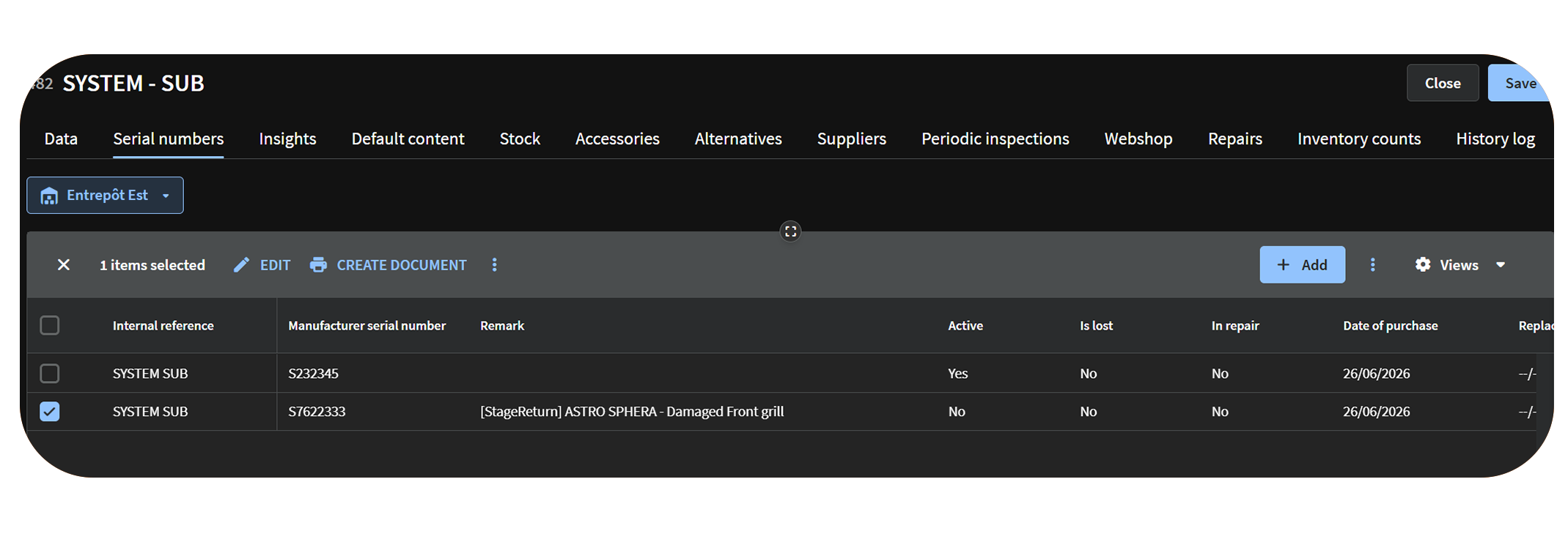
When a repair is created in StageReturn for equipment with a serial number, the integration can locate the corresponding equipment in Rentman.
If ERP immobilization is enabled, StageReturn can mark the equipment as unavailable in Rentman so that it cannot be used for the duration of the repair.
A piece of equipment is reported for repair with the issue "Damaged connector". StageReturn finds its serial number in Rentman and marks it as unavailable until the repair is completed.
5. Non-Serialized Equipment and Inventory Changes
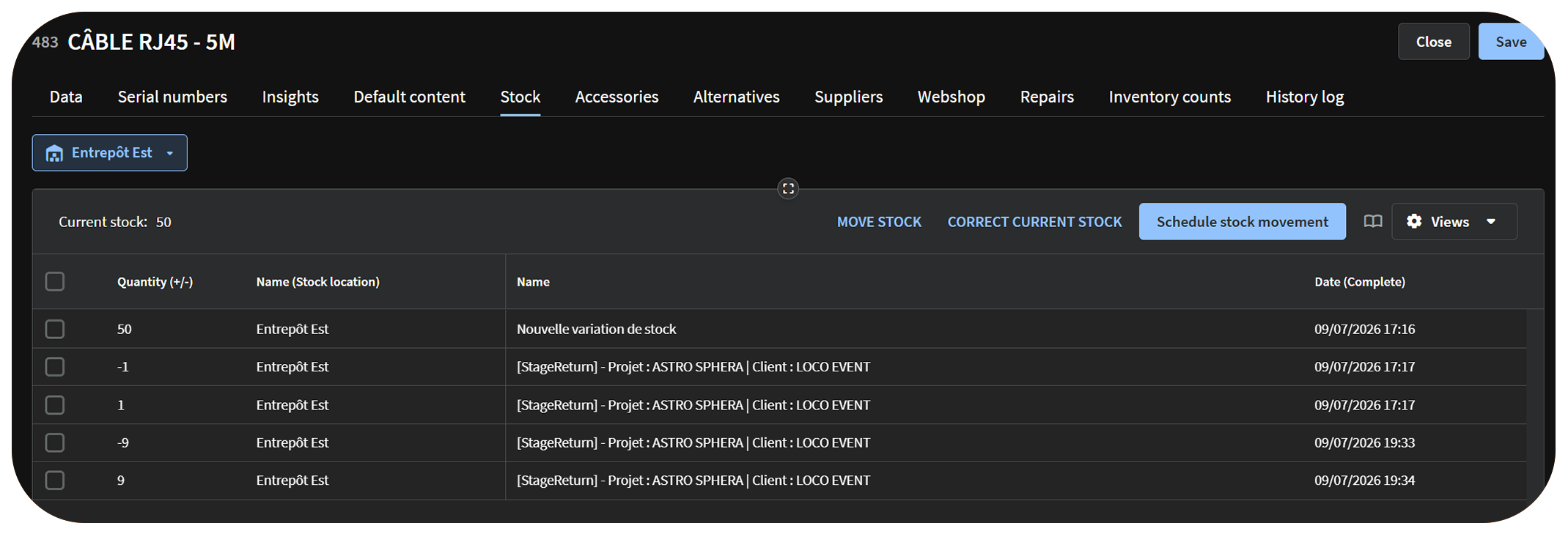
Non-serialized equipment is managed by quantity rather than by serial number. To synchronize it, it must be linked to the corresponding item in Rentman.
Once the mapping is configured, StageReturn can automatically apply inventory changes when equipment is reported as missing or returned.
Five cables are reported as missing in StageReturn. The available quantity of the linked Rentman item is reduced by five. When two cables are reported as returned, two units are automatically restored.
6. Link a Non-Serialized Equipment Item
From the StageReturn administration panel, open the Equipment Synchronization page and search for the corresponding Rentman item.
This mapping allows StageReturn to determine which Rentman item should be updated whenever a quantity is reported as missing or returned.
- Verify the name and reference of the Rentman item.
- Link only items that are truly equivalent.
- Avoid linking multiple StageReturn equipment items to the wrong Rentman item.
- Verify the selected connection and warehouse before saving.
7. Synchronized Features
| Feature | Availability | Description |
|---|---|---|
| API token authentication | Availability | Secure connection between StageReturn and Rentman. |
| Repairs | Availability | Repair tracking is managed in StageReturn. |
| ERP immobilization of serialized equipment | Availability | Equipment can be marked as unavailable in Rentman. |
| Non-Serialized Equipment | Availability | Links a StageReturn equipment item to a Rentman item. |
| Deduction of Missing Quantities | Availability | The missing quantity is deducted from the Rentman inventory. |
| Reintegration of Returned Quantities | Availability | The returned quantity is added back to the Rentman inventory. |
| Warehouse Connection | Availability | Each warehouse maintains its own synchronization scope. |
| Statuses and Errors | Availability | StageReturn displays useful synchronization information. |
8. Synchronization Errors and Monitoring
StageReturn can display a synchronization status, the date of the last operation, or an error message whenever an action cannot be completed.
A synchronization error does not remove the incident or repair. The information remains stored in StageReturn.
Example: If the serial number does not exist in Rentman, the repair remains available in StageReturn, and the synchronization status indicates that no matching equipment was found.
9. Best Practices
- Protect the Rentman API token like a password.
- Test the connection after every change.
- Verify serial numbers between StageReturn and Rentman.
- Check non-serialized equipment mappings.
- Verify the assigned warehouse before enabling synchronization.
- Enable ERP immobilization only when necessary.
- Review synchronization statuses if unexpected stock changes occur.
Frequently Asked Questions
Find answers to the most common questions about the Rentman integration.
What happens if equipment does not exist in Rentman ?
The incident or repair remains recorded in StageReturn. Only the Rentman synchronization cannot be completed.
Can Rentman be used with multiple warehouses ?
Yes. Connections can be assigned to specific warehouses to keep synchronization scopes separate.
Are non-serialized equipment items supported ?
Yes. They can be linked to Rentman items to synchronize missing and returned quantities.
Does a repair always immobilize the equipment?
No. ERP immobilization is independent of the repair status.
Does StageReturn replace Rentman?
No. StageReturn complements Rentman by providing incident reporting, photo evidence, history, and repair tracking.
Key Takeaways
The Rentman integration links incident and repair tracking in StageReturn with equipment availability and inventory quantities managed in Rentman.
